
WHAT'S NEW IN NOMADIA PROTECT ?
Find out here about the latest new features in the Nomadia Protect mobile app, the PC application and their back-office : Summer '26 ; Spring '26.
Version Summer '26 (3.2)
Publishing date: 9th of June 2026
Main new features
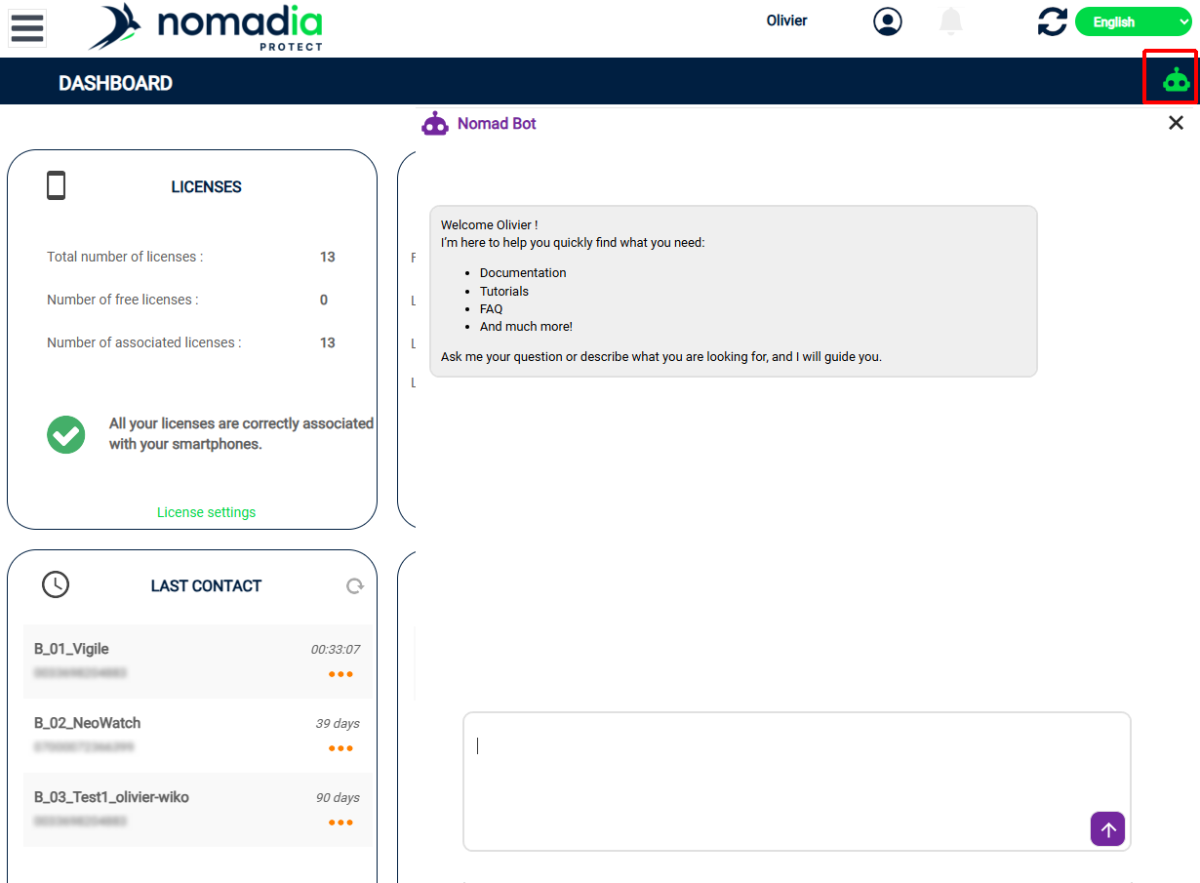
Back office: AI chatbot
The AI chatbot allows you to access administration documentation, FAQs, and mobile app documentation in a unique and simple way by asking questions in natural language.
Back office: multi-account mode
In the multi-account mode of the back office, data export now includes fields for the installed app version, the device's OS version, and the associated account name.
Furthermore, transferring licenses from one account to another is now possible.
Mobile app: Displaying notifications in the history
If you use notifications to communicate between users of the mobile app, these are now clickable in the history to be displayed as originally.
Mobile app: protection schedule and battery life management (Android)
On Android, a system has been implemented to check at regular intervals that the application has not been stopped by the system, which could happen on some phones, thus disabling protection. If necessary, the application is restarted.
Furthermore, in scheduled activation mode, the application is now completely shut down when the user is outside of a scheduled period, ensuring that no energy is consumed as soon as the break exceeds one hour. It is automatically restarted a few minutes before the next scheduled reactivation.
If the user wishes to force the activation of the protection outside the activation period, this is still possible by manually starting the application.
If the configuration was updated outside the protection period, you must manually start the application to retrieve the changes or wait for the next scheduled activation according to the old settings.
Version Spring '26
Publishing date: February 9th, 2026
Main new features
Common version of the mobile app for Android and iOS smartphones
The new version (3.0) of the Nomadia Protect mobile app is now compatible with Apple phones.
Protection activation as per schedule
Control the times of day when the Nomadia Protect application is active, thus avoiding false alerts outside of working hours, forgetting to reactivate, or even excessive battery consumption.
Available as a new configuration tab for your smartphones in the back office, this feature allows you to choose the times of day when the Nomadia Protect app will protect your users.
You can choose multiple slots per day, active days and you can even set vacation periods.
On the phone, you can (if the administrator allows it) pause the protection for lunch or for a meeting. You can also force the activation of the protection outside of standard working hours if you need to intervene exceptionally during overtime or on-call.
Thanks to automatic pausing, there is no need to remember to quit the app and restart it at the start of the day, thus limiting forgetfulness.
We are currently working on making sure the app does not consume battery when protection is not active, but this is not yet effective.
Notifications sur smartphones
Enjoy receiving notifications on the latest version of the Nomadia Protect mobile app, on Android and iPhones.
Notifications allow communication between smartphones or from the server to a group of smartphones.
For each type of event (use of a pre-programmed button, activation, arrival near a Bluetooth beacon, etc.), you can decide to display a specific message containing the information you have chosen for a specific set of smartphones in your organization that have Nomadia Protect installed.
The applications of this feature cover many needs:
- Request for help from smartphones within sight of a specific Bluetooth beacon (e.g. near the smartphone in distress)
- Broadcasting a message to a specific group ("Need help loading", "Shall we meet for a break?")
- Inform the manager of the activation of the protection
- Share your location on a map with a given group
- etc.
Exporting table data to Excel format
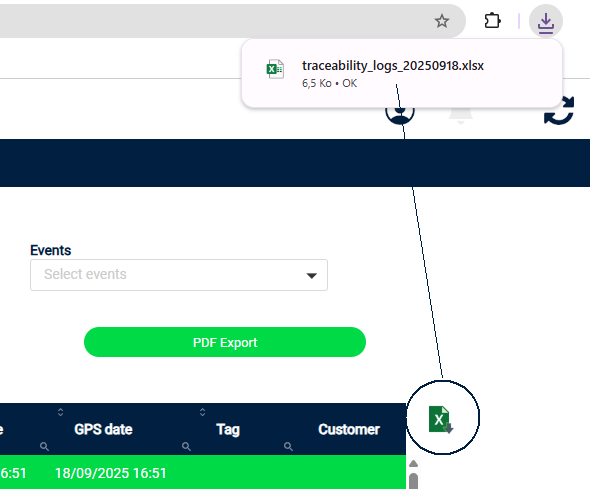
The Excel export functionality has been changed, now taking the form of an Excel button next to the table, directly clickable.
The generated file is now named with the name of the associated menu in addition to the generation date.
Various improvements
- Information on the chargeable nature of the Securitas remote monitoring number
- New option in the Miscellaneous tab to indicate that the phone does not have a SIM card and will use WIFI
- Refining fall detection sensitivity
- Minimum date for traces set to the maximum duration of log retention
- Removed the update widget which is no longer useful (updates from the server are automatically detected)
- Settings\Events: New Copy configuration button from one event to another
- Settings\Events: Export configurations in CSV format to better visualize all specific configurations
- Multi-account mode: ability to transfer a license from one account to another